
A well-designed background can make a Shopify store look more modern, branded, and visually engaging. CSS gradients allow you to create backgrounds directly with CSS instead of uploading a background image. Modern browsers support linear, radial, conic, and repeating gradients, making them useful for hero banners, announcement bars, product sections, collection pages, buttons, cards, and other storefront elements.
Shopify also supports CSS customization directly through the theme editor. Depending on the theme, you can add custom CSS globally or at the section level. Shopify’s current Custom CSS feature supports gradient styling.
If your Shopify product shows “Sold Out” despite available inventory, read our guide on fixing Shopify’s sold-out issue to find and resolve common causes.
What Is a CSS Gradient ?
A CSS gradient creates a smooth transition between two or more colors.
Unlike a traditional background image, a CSS gradient is generated by the browser. This means you don’t need to upload an image just to create a simple color transition.
For example: background: linear-gradient(to right, #ff7e5f, #feb47b);
This creates a gradient that transitions from one color to another from left to right.
Types of CSS Gradients
Before adding a gradient to Shopify, it’s useful to understand the main CSS gradient types.
1. Linear Gradient:
A linear gradient changes colors along a straight line (Example: top to bottom or left to right)
For example: background: linear-gradient(to right, #6a11cb, #2575fc);
2. Radial Gradient:
A radial gradient spreads from a central point.
For example: background: radial-gradient(circle, #ffffff, #dbeafe);
3. Conic Gradient
A conic gradient transitions around a central point.
For example: background: conic-gradient(#6a11cb,#2575fc,#6a11cb);
This is useful for decorative backgrounds and special visual effects, although linear and radial gradients are generally more practical for standard Shopify storefront sections.
Add a Gradient Using Shopify’s Theme Editor
Most modern Shopify themes allow you to apply gradients directly via color schemes. The gradient picker can provide controls for the gradient type, angle, position, colors, and opacity. The exact options depend on the theme and its version.
Step 1: Open the Shopify Theme Editor
From Shopify admin, go to: Online Store → Themes → Edit theme
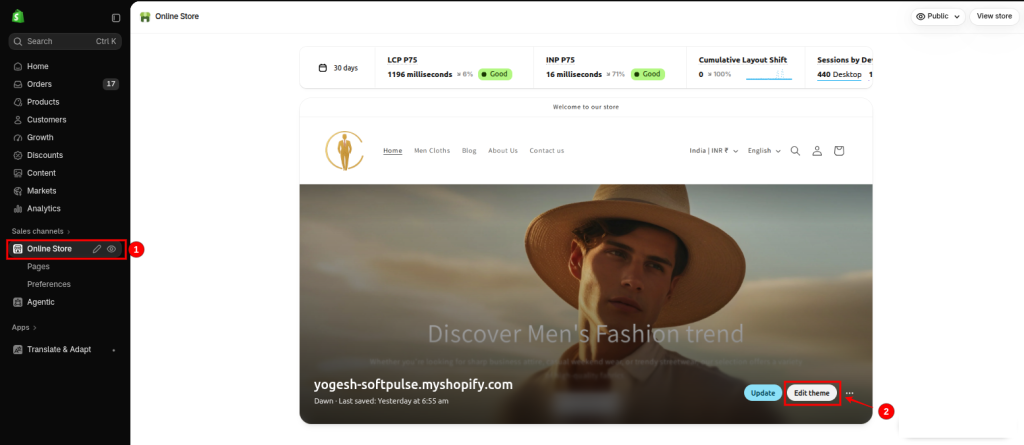
This opens the theme editor.
Step 2: Open Theme Settings
Inside the theme editor, click the Theme settings icon.

Then select: Colors
The available color controls depend on the theme and its architecture. Shopify’s newer themes can use color palettes, while other themes use color schemes.
Step 3: Choose a Gradient Background
After selecting the color scheme, Shopify offers options to customize the background. Depending on your theme, you can use Shopify’s built-in gradient picker or add a gradient using CSS.
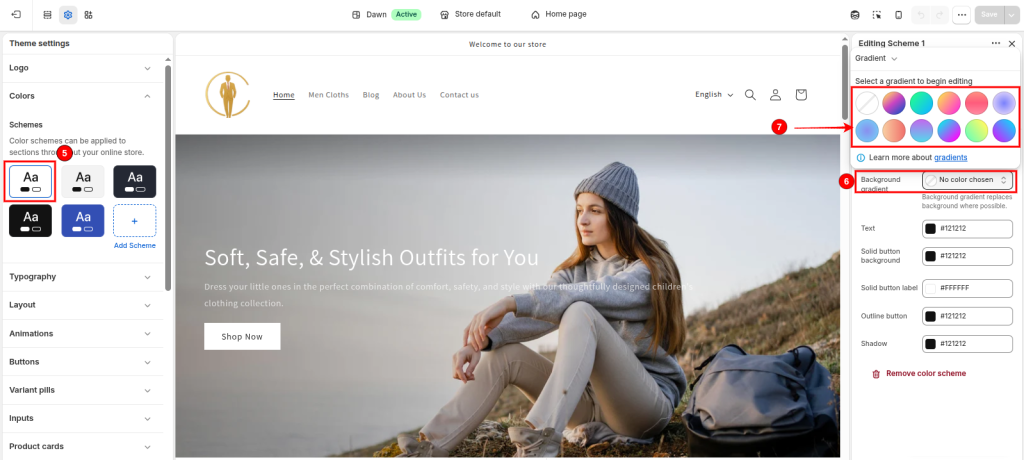
Option 1: Use Shopify’s Built-in Gradient Picker
If your theme provides a Background gradient setting, you can use Shopify’s built-in gradient picker to create your gradient without writing CSS.
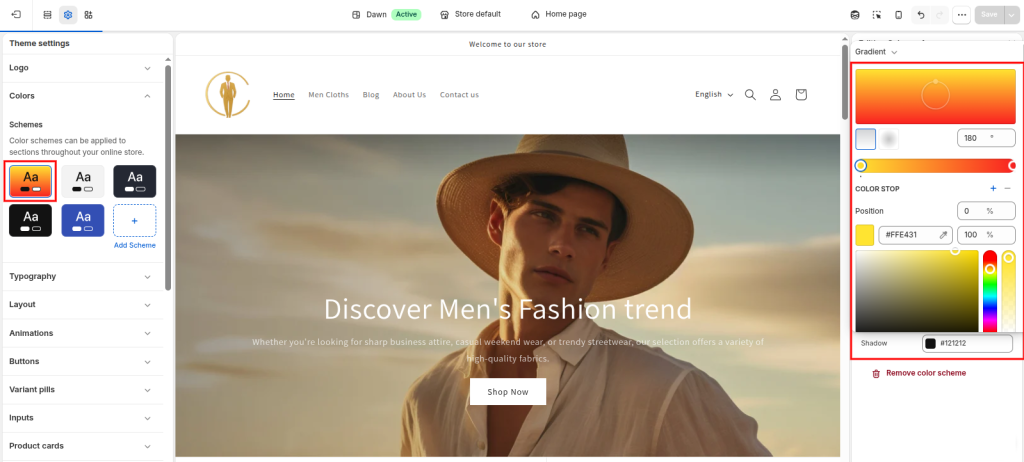
You can customize options such as:
- Gradient type
- Direction or angle
- Position
- Start and end colors
- Color opacity
Option 2: Add a Gradient Using CSS
If you want more control over the gradient, Shopify also lets you specify it in CSS. Select the CSS option in the gradient setting and enter your CSS gradient value.

For example: linear-gradient(135deg, #6A11CB, #2575FC)
For a radial gradient : radial-gradient(circle, #FFFFFF, #DBEAFE)
You can also use multiple color stops: linear-gradient( 90deg, #6A11CB 0%, #2575FC 50%, #EC4899 100%)
Step 4: Click Save
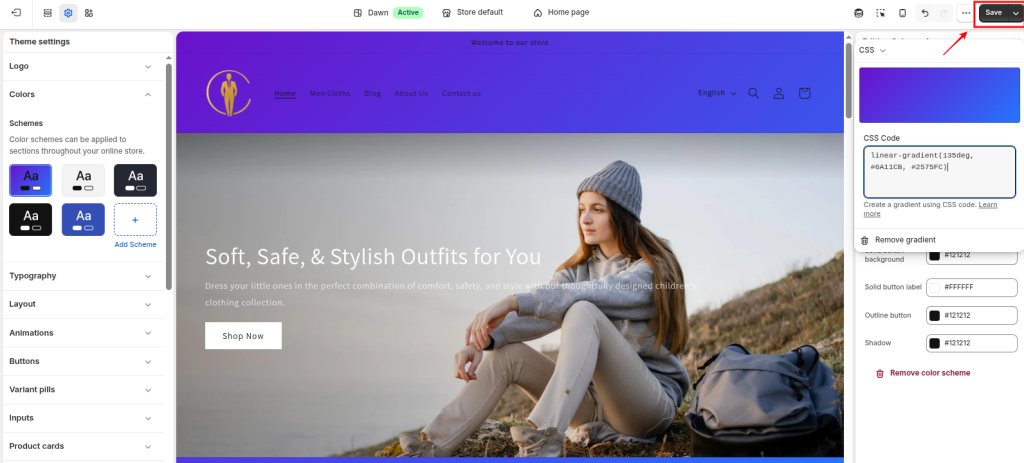
After creating the gradient, check how it looks in the theme preview on both desktop and mobile. If everything looks correct, click Save.
Common CSS Gradient Examples for Shopify
The following examples can help you choose a gradient style for your storefront.
| Gradient style | CSS gradient value | Recommended use |
| Horizontal | linear-gradient(to right, #6a11cb, #2575fc) | Announcement bars |
| Vertical | linear-gradient(to bottom, #ffffff, #dbeafe) | Product sections |
| Diagonal | linear-gradient(135deg, #ff7e5f, #feb47b) | Hero banners |
| Radial | radial-gradient(circle, #ffffff, #dbeafe) | Featured collections |
| Three-color | linear-gradient(90deg, #6a11cb, #2575fc, #ec4899) | Promotional sections |
These values can be pasted directly into a compatible Background gradient CSS field. When using the Custom CSS editor instead, place the value inside a complete background declaration.
Important Things to Check When Using Shopify CSS Gradients
Before publishing your gradient background, keep these points in mind.
- Theme compatibility: Some Shopify themes don’t provide built-in gradient settings, and some sections don’t display gradients even when their assigned color scheme includes one.
- Color scheme behavior: Updating a shared color scheme can change several sections at once.
- Text readability: Choose gradient colors that provide sufficient contrast with headings, buttons, and other text. WCAG generally requires a contrast ratio of at least 4.5:1 for normal text and 3:1 for large text.
- Mobile appearance: A gradient can look different on smaller screens because section dimensions and content layouts change.
- Custom CSS priority: CSS overrides can take precedence over theme settings, leading to unexpected background behavior.
Shopify Community discussions also highlight situations where background colors or gradients don’t update due to custom CSS or other section-level styling. If your gradient doesn’t appear, first check the assigned color scheme and existing CSS overrides before editing theme files.
Conclusion
Adding a CSS gradient background to Shopify is a simple way to customize your store’s appearance without uploading additional background images.
If your theme supports Shopify’s built-in gradient picker, you can create a background using visual controls. For more advanced styling, the gradient CSS field lets you define custom directions and color stops. When those settings aren’t available, section-level or theme-wide Custom CSS offers another option.
Start with a gradient that matches your brand colors, apply it to the appropriate color scheme or section, and test it on both desktop and mobile before publishing.
If you need advanced storefront styling, custom theme sections, or help making gradient backgrounds work consistently across your store, Softpulse Infotech, a Shopify development agency, provides Shopify Development Services for custom Shopify theme design and development.
Frequently Asked Questions
1. How do I add a gradient background in Shopify without coding?
Open Online Store → Themes → Edit theme → Theme settings → Colors, select a color scheme, and click Background gradient. If your theme supports the built-in gradient picker, choose your colors and gradient style, then save the changes.
2. Does Shopify support CSS gradients?
Yes. Shopify supports CSS gradients through compatible theme settings and Custom CSS. Supported CSS gradient functions include linear-gradient(), radial-gradient(), and conic-gradient().
3. Can I add a gradient background to only one Shopify section?
Yes. If your theme supports color schemes, create or select a color scheme with your desired gradient and assign it to the relevant section. Alternatively, use section-level Custom CSS when available.
4. Why is my Shopify gradient background not showing?
Common causes include an unsupported theme setting, an incorrect color scheme assignment, an opaque background covering the gradient, or existing CSS overrides. Check these before editing your theme code.
5. Can I add a CSS gradient to Shopify product and collection pages?
Yes, provided the relevant sections support gradient-enabled color schemes or can be styled with custom CSS. The exact implementation depends on your Shopify theme.
6. Will CSS gradient backgrounds slow down my Shopify store?
CSS gradients don’t require separate image downloads, making them a practical alternative to simple gradient background images. However, complex visual effects, animations, and other page elements can still affect rendering performance.
7. Can I use CSS gradients in Shopify checkout?
Shopify’s theme Custom CSS feature doesn’t apply to the checkout page. Checkout customization uses separate settings and supported extension capabilities.