Want to improve your shipping experience? Ease and convenience await when you integrate the Indian Logistics Services Shopify app with Amazon Shipping. Well, it is possible and is simpler than you think.
You don’t need to go anywhere else if you think of integrating with Amazon Shipping on your Shopify store.
In today’s competitive eCommerce market, integration between various platforms is crucial for efficient order management and streamlined shipping processes. If you are an Indian-based online seller looking to integrate an Amazon Shipping delivery partner with your eCommerce Shopify store, the Indian Logistics Services Shopify app is the best option.
This blog post shows you the step-by-step process of integrating Amazon Shipping with Shopify using the Indian Logistics Services Shopify App with a simple one-click Shopify app. It’s a simple process. You can ship your products easily once you’ve done it.
Quick Guide:
- About Amazon Logistics Shipping
- Integrating Amazon Logistics Shipping with Shopify
- About Indian Logistics Services
- How to Enable Amazon Shipping into the Shopify store using an app?
- Follow the steps for setting up an Amazon Shipping account in the logistics app admin.
- Follow the general step-by-step process to get started with the Amazon Shipping API
- Conclusion
- FAQ Section
About Amazon Logistics Shipping
Amazon Logistics Shipping is a service offered by Amazon that focuses on the fulfillment and delivery of your Shopify products. It is an alternative to traditional shipping carriers and provides sellers with a reliable and cost-effective shipping solution.
Integrating Amazon Logistics Shipping with Shopify
To integrate Amazon Logistics Shipping with your Shopify store, you can utilize the Indian Logistics Services app available on the Shopify App Store.
So without further ado, let’s get started!
Indian Logistics Services is a Shopify app developed by Softpulse Infotech Pvt. Ltd. This app helps increase your customer’s buying confidence and boost sales.
About Indian Logistics Services:
Indian Logistics Services is an integrator between your logistic partner and your store. You can ship thousands of orders from this app without any manual effort. This app provides a single-platform shipment solution for multiple couriers and checks all logistics statuses on a single screen.
How to enable Amazon Shipping into the Shopify store using an app?
Step 1: From the Shopify dashboard, hover over the Sales channel in the left-hand sidebar.
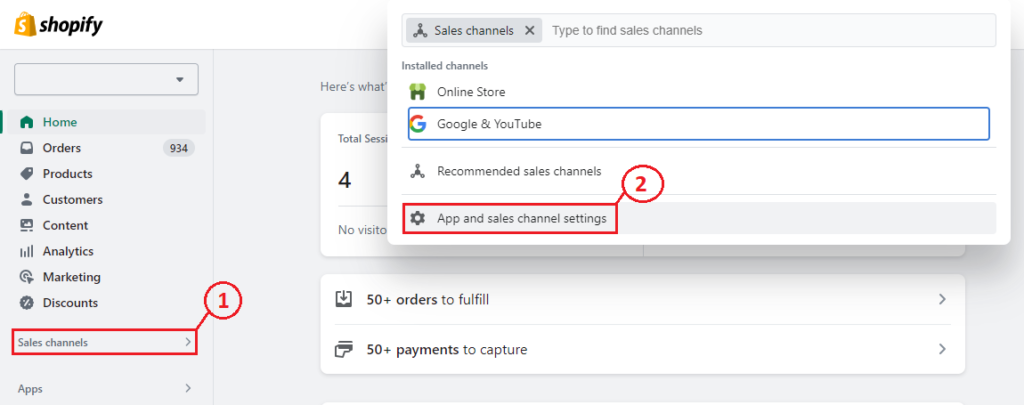
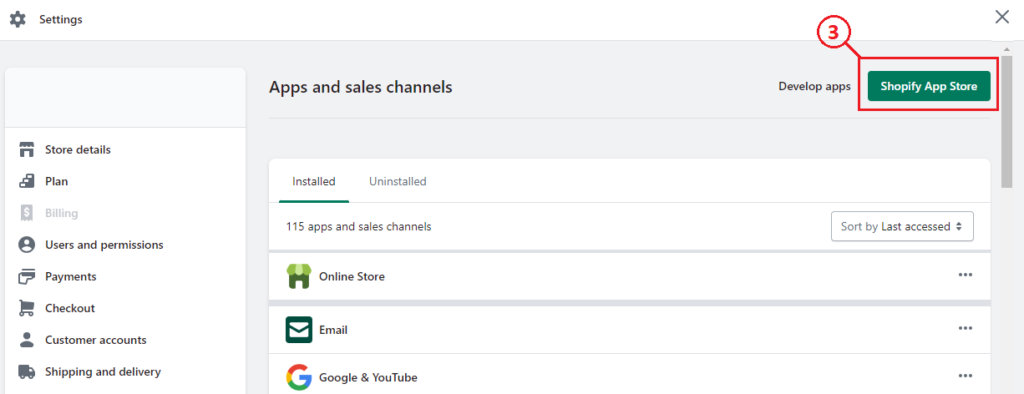
Step 2: Click on App and sales channel settings, then your store in the top right corner, and click Shopify App Store. Once you’ve done that, search for Indian Logistics Services.
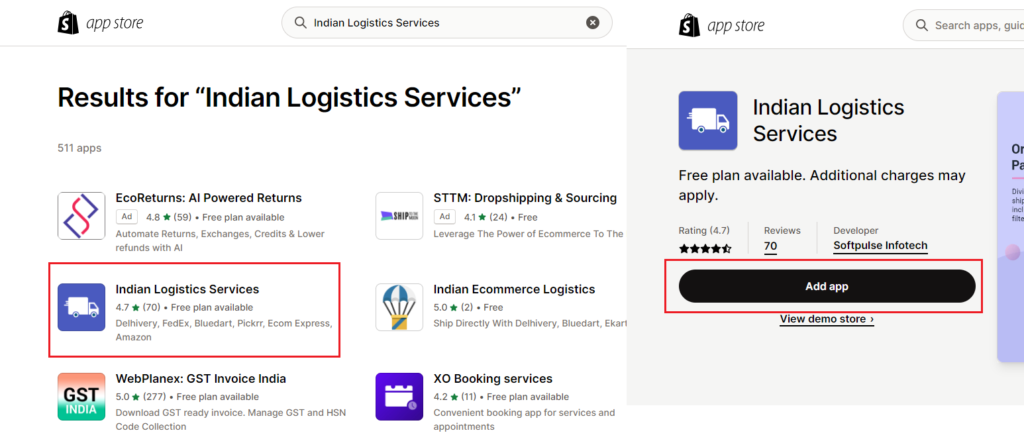
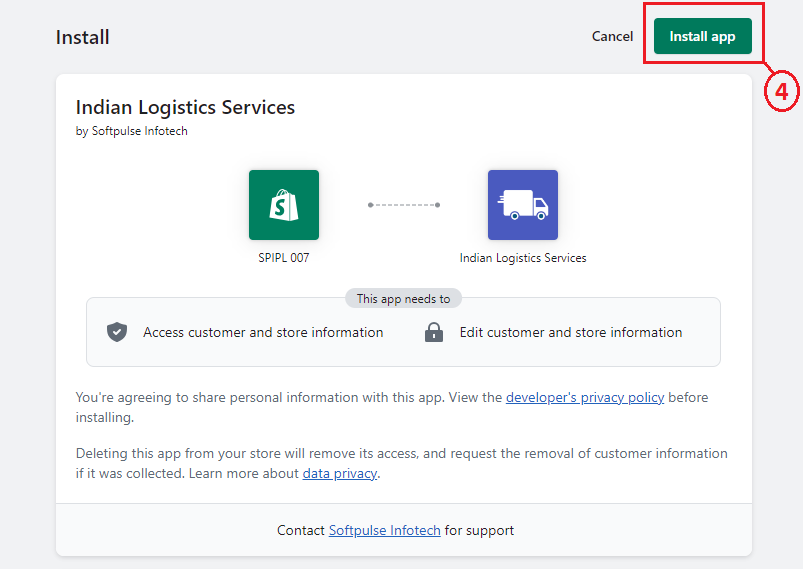
Step 3: Install the app.
Follow the steps for setting up an Amazon Shipping account in the logistics app admin.
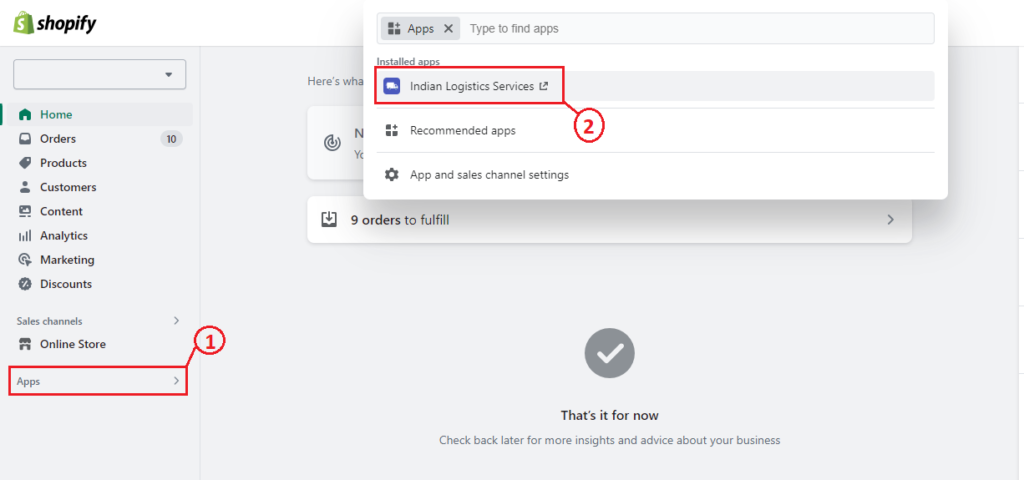
Step 1: By going to Apps > Indian Logistics Services
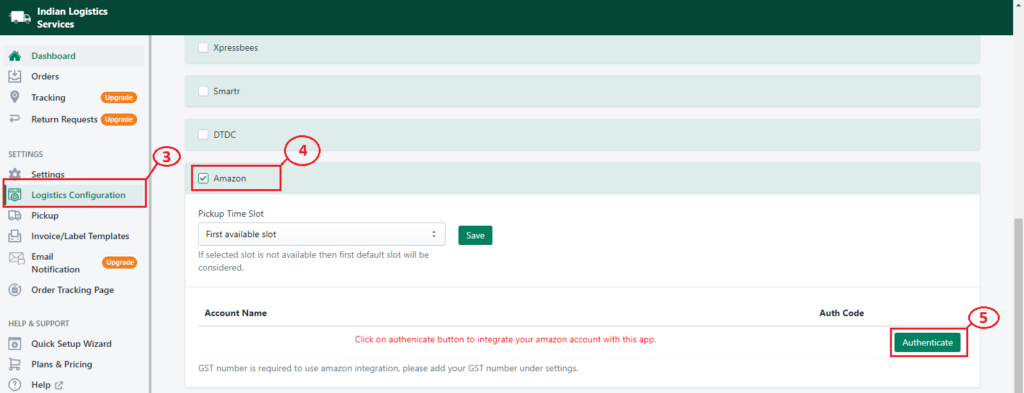
Step 2: Select Logistics Configuration > Select the Amazon checkbox and Click on the Authenticate button
Follow the general step-by-step process to get started with the Amazon Shipping API.
1. Go to the Amazon Shipping website (https://ship.amazon.in/) in your web browser.
2. For Authentication please log in to Indian logistic services select Logistic Configuration and click on Amazon authenticate button.
This step will connect your Amazon account with your store to ship the orders by Amazon, after authentication you will be able to ship the orders from Indian Logistics Services by Amazon.
Conclusion
Indian Logistics Services Shopify app has flexible pricing and a Free installation. You can try Indian Logistics Services for free and see how it works for Amazon shipping integrations. Start leveraging the power of the Indian Logistics Services app today and optimize your eCommerce business for success. If you want to learn more about how Indian Logistics Services can help you get an edge over your competitors in shipping management, add this app to your Shopify store now to follow the upper guidelines.
Frequently Asked Questions
1. What are the benefits of Amazon Shipping?
Amazon Shipping offers fast and reliable delivery, shipment tracking, cost-effective shipping rates, and trusted delivery services.
2. How do I enable Auto Shipments?
Go to the app’s Settings → Auto Shipment tab. Enable the option, set the shipment time, configure your rules, and save the settings.
3. How can I push tracking information to Shopify?
When you ship and fulfill orders through the Indian Logistics Services app, tracking details are automatically sent to Shopify, and customers receive tracking notifications by email.
4. Can customers track their orders on my store?
Yes, you can set up a branded order tracking page where customers can enter their order number or AWB number to check shipment status.
5. How can customers submit a return request?
Set up a return request link on your store using the app’s return request setup instructions. Customers can then submit return requests directly.
6. Where can I find documentation for the Indian Logistics Services app?
You can find setup guides and other helpful resources in the Indian Logistics Services documentation.
7. Which logistics services does the app support?
The app supports multiple logistics providers, including Amazon Shipping, Delhivery, FedEx, Blue Dart, Pickrr, Ecom Express, DTDC, Ekart, Smartr, and Xpressbees. You can connect multiple logistics accounts and manage forward and reverse shipments with tracking.